
 kuberik
Set Deployment Windows
Hold automatic deploys outside the hours you choose, or block them during a freeze. A RolloutSchedule turns its time rules into a gate on every Rollout it selects.
On this page
action: Allow, the gate passes only inside the window; a release that arrives outside it deploys when the window opens.Allow deploys during business hours
A schedule selects Rollouts by label and is active while any of its rules matches the current time. Its action defaults to Deny, which holds deploys while the schedule is active; with action: Allow, deploys pass only while it is active. This one allows deploys Monday to Friday, 09:00 to 17:00 New York time.
apiVersion: kuberik.com/v1alpha1
kind: RolloutSchedule
metadata:
  name: business-hours
  namespace: hello-world
  annotations:
    gate.kuberik.com/pretty-name: "Business hours"
    gate.kuberik.com/description: "Deploys allowed Monday to Friday, 09:00 to 17:00 New York time"
spec:
  rolloutSelector:
    matchLabels:
      schedule: business-hours
  rules:
    - name: weekday-hours
      timeRange:
        start: "09:00"
        end: "17:00"
      daysOfWeek: [Monday, Tuesday, Wednesday, Thursday, Friday]
  timezone: America/New_York
action: AllowAllow passes deploys while a rule matches and holds them otherwise; Deny is the reverse. A held deploy starts automatically when the gate passes again. A closed window does not hold a Rollout’s first deploy or a deploy you start by hand.
timezone defaults to UTC. Always set action: Allow on an allow window: without it, the schedule blocks deploys during exactly the hours you meant to allow.
Label the Rollout so the schedule selects it.
apiVersion: kuberik.com/v1alpha1
kind: Rollout
metadata:
  name: hello-world
  namespace: hello-world
  labels:
    schedule: business-hours  # matches rolloutSelector
spec:
  releaseSourceRef:
name: hello-worldThe two annotations name the gate in the dashboard. Kuberik copies them onto the RolloutGate it creates for each selected Rollout.
Freeze deploys across namespaces
A ClusterRolloutSchedule works the same way, and adds namespaceSelector to reach Rollouts in every namespace with matching labels. This one blocks production deploys over the holidays. A dateRange includes both its start and end day.
apiVersion: kuberik.com/v1alpha1
kind: ClusterRolloutSchedule
metadata:
  name: holiday-freeze
  annotations:
    gate.kuberik.com/pretty-name: "Holiday freeze"
    gate.kuberik.com/description: "No production deploys from 23 to 26 December"
spec:
  rolloutSelector:
    matchLabels:
      tier: frontend
  namespaceSelector:
    matchLabels:
      environment: production
  rules:
    - name: holiday
      dateRange:
        start: "2026-12-23"
        end: "2026-12-26"
  timezone: America/New_York
action: DenyCombine rules
Each rule can set timeRange (24-hour HH:MM), daysOfWeek (Monday to Sunday) and dateRange (YYYY-MM-DD). Within one rule, every field you set must match. Across rules, any match makes the schedule active.
A timeRange whose end is earlier than its start crosses midnight. daysOfWeek is checked against the current day, so the hours after midnight count as the next day. This schedule allows deploys overnight on weekdays and all weekend.
apiVersion: kuberik.com/v1alpha1
kind: RolloutSchedule
metadata:
  name: off-peak
  namespace: hello-world
spec:
  rolloutSelector:
    matchLabels:
      schedule: off-peak
  rules:
    - name: weeknights
      timeRange: {start: "22:00", end: "06:00"}  # crosses midnight
      daysOfWeek: [Monday, Tuesday, Wednesday, Thursday, Friday]
    - name: weekend
      daysOfWeek: [Saturday, Sunday]
  timezone: Europe/London
action: AllowTo block a busy period instead, use the same rule shape with action: Deny.
apiVersion: kuberik.com/v1alpha1
kind: RolloutSchedule
metadata:
  name: peak-hours
  namespace: hello-world
spec:
  rolloutSelector:
    matchLabels:
      tier: frontend
  rules:
    - name: lunch-peak
      timeRange: {start: "11:00", end: "14:00"}
      daysOfWeek: [Monday, Tuesday, Wednesday, Thursday, Friday]
  timezone: America/New_York
action: DenyCheck the result
kubectl get shows whether each schedule is active now and how many Rollouts it selects. ACTIVE reads true while a rule matches and false otherwise.
kubectl get rolloutschedule -n hello-worldNAME ACTION ACTIVE MATCHING AGE
business-hours Allow false 1 3hWhile the window is closed, the dashboard holds the rollout and names the schedule, its hours, and when automatic deploys resume.
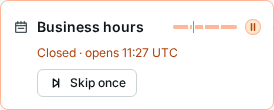
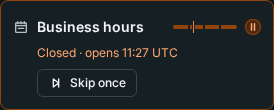
status.activeRules lists the rules that match now and status.nextTransition says when the schedule next opens or closes.
Next steps
- Gate deploys Require a Manual Approval Hold each new build of a Rollout until a person approves it in the dashboard or with kubectl.
- Gate deploys Wait for Service Dependencies Hold a service until the service it needs has shipped a compatible version.
- Reference Annotations Every annotation Kuberik reads or writes, with its values and effect.