Deployment Schedules
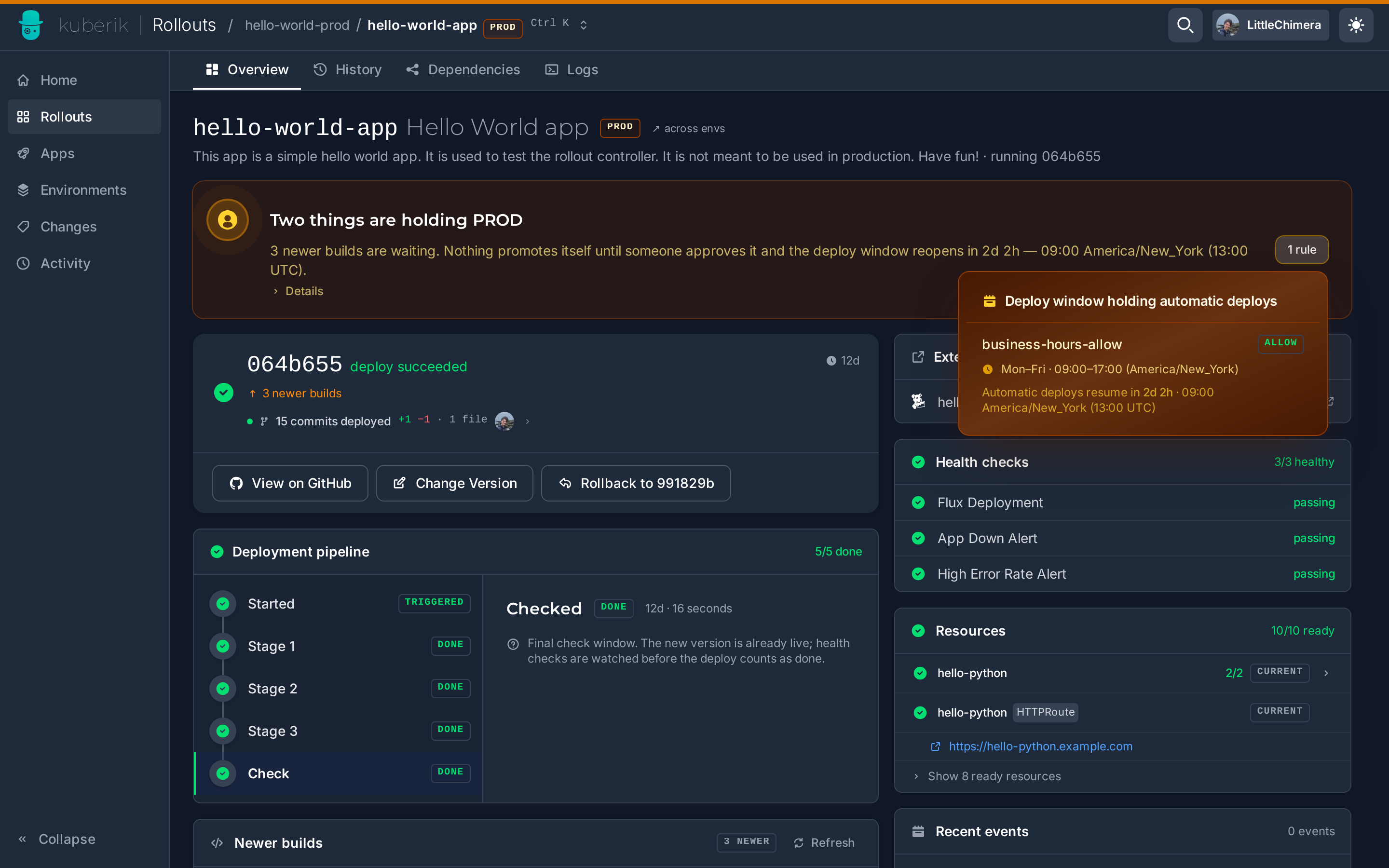
Use RolloutSchedule to control when deployments can occur based on time windows, days of week, or date ranges.
Create a Schedule
A schedule matches rollouts by label selector and defines rules for when deployments are allowed or blocked.
schedule.yaml
apiVersion: kuberik.com/v1alpha1
kind: RolloutSchedule
metadata:
  name: business-hours
  namespace: default
  annotations:
    gate.kuberik.com/pretty-name: "Business Hours Only"
    gate.kuberik.com/description: "Deployments allowed Mon-Fri 9 AM - 5 PM EST"
spec:
  rolloutSelector:
    matchLabels:
      schedule: business-hours
  rules:
    - name: "weekday-hours"
      timeRange:
        start: "09:00"
        end: "17:00"
      daysOfWeek:
        - Monday
        - Tuesday
        - Wednesday
        - Thursday
        - Friday
  timezone: "America/New_York"
  action: Allow
Label your Rollout to apply the schedule.
rollout.yaml
apiVersion: kuberik.com/v1alpha1
kind: Rollout
metadata:
  name: my-app
  labels:
    schedule: business-hours
spec:
  releasesImagePolicy:
    name: my-app-policy
Cluster-Wide Schedules
Use ClusterRolloutSchedule to apply schedules across namespaces.
cluster-schedule.yaml
apiVersion: kuberik.com/v1alpha1
kind: ClusterRolloutSchedule
metadata:
  name: production-freeze
  annotations:
    gate.kuberik.com/pretty-name: "Holiday Freeze"
    gate.kuberik.com/description: "Blocks production deployments during holidays"
spec:
  rolloutSelector:
    matchLabels:
      tier: frontend
  namespaceSelector:
    matchLabels:
      environment: production
  rules:
    - name: "holiday"
      dateRange:
        start: "2026-12-23"
        end: "2026-12-26"
  timezone: "America/New_York"
  action: Deny
Actions
| Action | When Active | When Inactive |
|---|---|---|
Allow | Deployments proceed | Deployments blocked |
Deny | Deployments blocked | Deployments proceed |
Annotations
| Annotation | Purpose |
|---|---|
gate.kuberik.com/pretty-name | Display name shown in dashboard |
gate.kuberik.com/description | Description shown in dashboard |
Rule Options
Each rule can combine:
timeRange- Start/end in HH:MM format (24-hour), supports cross-midnightdaysOfWeek- Monday, Tuesday, Wednesday, Thursday, Friday, Saturday, SundaydateRange- Start/end in YYYY-MM-DD format
Rules are OR’d: the schedule is active if any rule matches.
Examples
Block Peak Hours
peak-hours.yaml
apiVersion: kuberik.com/v1alpha1
kind: RolloutSchedule
metadata:
  name: peak-hours-deny
spec:
  rolloutSelector:
    matchLabels:
      tier: frontend
  rules:
    - name: "peak-traffic"
      timeRange:
        start: "11:00"
        end: "14:00"
      daysOfWeek: [Monday, Tuesday, Wednesday, Thursday, Friday]
  action: Deny
Weekend Only
weekend-only.yaml
apiVersion: kuberik.com/v1alpha1
kind: RolloutSchedule
metadata:
  name: weekend-only
spec:
  rolloutSelector:
    matchLabels:
      schedule: weekend
  rules:
    - name: "weekend"
      daysOfWeek: [Saturday, Sunday]
  action: Allow
Night Deployments
night.yaml
apiVersion: kuberik.com/v1alpha1
kind: RolloutSchedule
metadata:
  name: night-deployment
spec:
  rolloutSelector:
    matchLabels:
      schedule: night
  rules:
    - name: "overnight"
      timeRange:
        start: "22:00"
        end: "06:00"
  action: Allow
Multiple Windows
Rules are OR’d together—deployments proceed if any rule matches.
flexible.yaml
apiVersion: kuberik.com/v1alpha1
kind: RolloutSchedule
metadata:
  name: flexible-windows
spec:
  rolloutSelector:
    matchLabels:
      schedule: flexible
  rules:
    - name: "morning"
      timeRange: {start: "06:00", end: "09:00"}
      daysOfWeek: [Monday, Tuesday, Wednesday, Thursday, Friday]
    - name: "evening"
      timeRange: {start: "18:00", end: "22:00"}
      daysOfWeek: [Monday, Tuesday, Wednesday, Thursday, Friday]
    - name: "weekend"
      daysOfWeek: [Saturday, Sunday]
  action: Allow